Archiving travel & event photo bursts vs deleting camera-roll history: keeping memories in 1 HEVC archive
When a "Storage Almost Full" alert pops up at an airport or birthday party, panic-deleting entire old albums is irreversible after 30 days. Photo2Video Archive ($3.99 once) gives you a middle path between keeping 4,000 loose trip bursts in Recents and deleting them forever: pick your best 30 favorites to leave untouched in Apple Photos, and pack the remaining 3,970 context shots into one verified, restorable HEVC archive video.
1. The "Keep Top 2%, Archive the Other 98%" travel method
A two-week trip easily generates 2,500 photos: museum plaques, train tickets, street menus, five angles of every landmark and twenty burst frames trying to get everyone’s eyes open. You rarely want all 2,500 crowding your daily Photos scroll, yet deleting the "extra" 2,400 erases the street names, meal order and travel timeline you love revisiting years later.
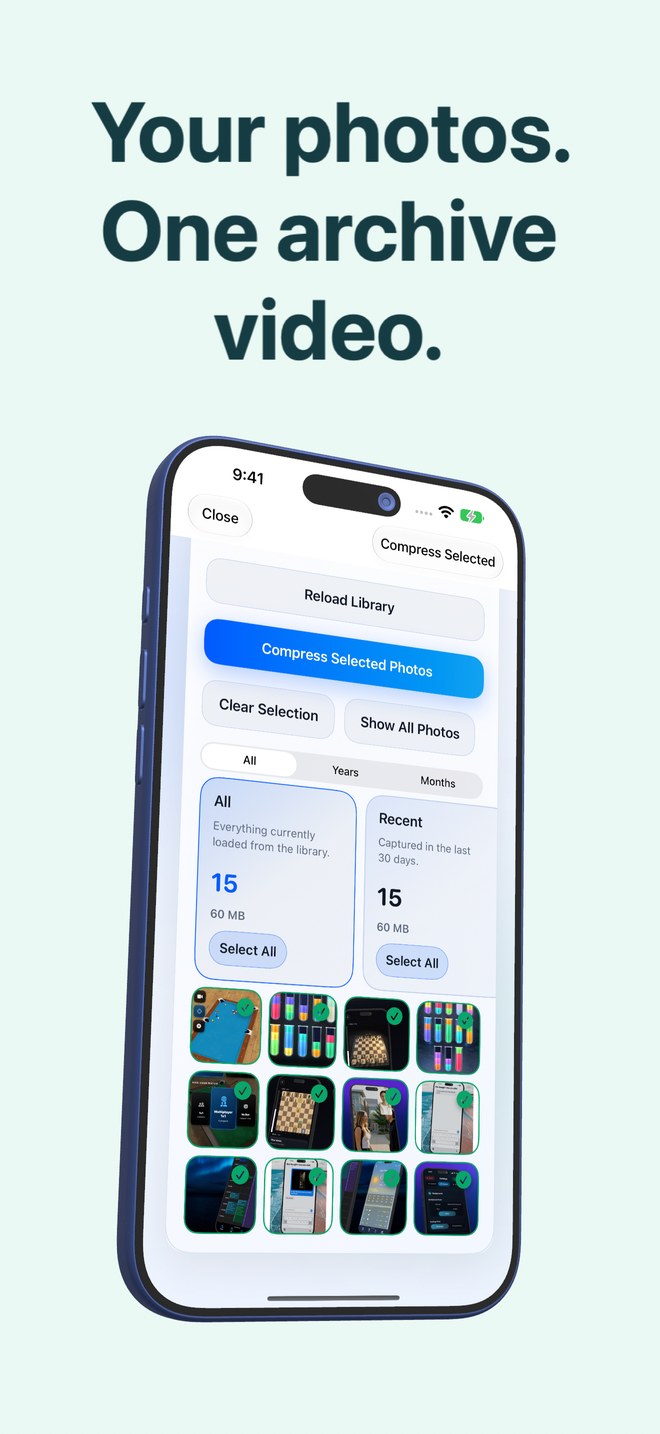
With Photo2Video Archive’s year/month filters and on-device Travel, City, Food, Nature and Documents stacks, you can leave your top favorite shots untouched in Apple Photos (and backed up losslessly) while consolidating the rest of the trip into one compact HEVC MP4 archive.
| Outcome | Leave all 3,000 loose | Panic-delete 2,800 photos | Keep 50 + Archive 2,950 in Photo2Video |
|---|---|---|---|
| Main Camera Roll readability | Clogged with near-duplicates & plaques | Clean | Clean — 50 highlights + 1 archive video |
| Ability to check a menu or street sign 3 years later | Yes | Zero — permanently gone after 30 days | Yes — open archive & preview or export that frame |
| Storage footprint in Apple Photos | Maximum | Lowest (through permanent loss) | Reduced per archive (exact math shown before deleting) |
| Emotional decision fatigue | None today, storage wall tomorrow | High — agonizing over every photo | Low — batch-select by month or stack |
2. Why travel bursts and renovation logs suit HEVC archiving
Sequential photos shot in the same room, stadium or landscape share similar lighting, palettes and backgrounds—the exact kind of batch where multi-frame HEVC video encoding shines compared with unrelated images. And because Photo2Video Archive embeds photo dates, names and Live Photo pairings in the MP4 manifest, you still know when each archived frame was taken.
| Batch example | Selection filter in app | Archival tip |
|---|---|---|
| Completed 2-week holiday or honeymoon outtakes | Years / Months + Travel / City / Food stacks | Back up top favorites losslessly first; archive the bulk outtakes |
| Home remodel, wiring & moving-box documentation | Months filter + Large / Portrait / Landscape | Export 2 test frames to verify pipe/label clarity before deleting |
| Kids’ sports games & school recital bursts | Last 30 days or Duplicates / Month filter | Keep best 5 Live Photos loose; pack the 300 burst frames |
| Old receipts, warranties & chat confirmations | Invoices, Documents, QR codes & Chats stacks | Verify small text legibility on sample frame export |
3. Don’t archive mid-panic without checking Recently Deleted & local packages
Two practical reminders when freeing space for an upcoming trip: do your archiving calmly on Wi-Fi/power before departure, remember that originals deleted through the system Photos sheet sit in Recently Deleted for 30 days unless emptied after verification, and account for app storage if keeping local byte-exact packages.
| Timing | Step | Why |
|---|---|---|
| 3 days before trip | Back up irreplaceable originals to SSD/Mac/cloud | Gives you an independent lossless safety net |
| 2 days before trip | Pack older cold trips in Photo2Video Archive & test-export frames | Verifies archive health without airport rush |
| 1 day before trip | Confirm deletion of verified loose batches & check free GB | Ready to shoot thousands of new trip photos stress-free |
Can I filter by a specific trip month in Photo2Video Archive?
Yes. The selection screen includes Years and Months filters alongside content stacks like Travel, City, Food and Nature, plus Show Selected Only to review your batch before encoding.
What if half my old trip photos are offloaded to iCloud?
Photo2Video Archive only shows and archives photos stored fully on your device; download the album locally in Apple Photos first if you want cloud-only items included.
Are Live Photos from a trip supported?
Yes. Live Photo pairings are recorded in the manifest; byte-exact Live Photo restoration requires the local originals package on the creating device (while the app remains installed).
Can I export just one museum plaque frame later without unpacking all 2,000 trip photos?
Yes—open the archive in Decompression, tick just that single frame and tap Export Selected to Photos.