How Mixed Camera Roll to 4K HEVC Shrinks 40,000 Photos (Multi-Year Roll) From 144.0 GB to 14.4 GB
Storing 40,000 individual Combined HEIC, JPEG, PNG & Social Imports as standalone files consumes roughly 144.0 GB because every single image encodes redundant color tables, background gradients, and file-system container overhead independently. Photo2Video Archive (Pixel Vault) uses Apple Silicon's hardware-accelerated 3840x2160 UHD 10-bit HEVC pipeline to sequence chronologically related photos into a high-efficiency 4K HEVC (H.265) video archive—reducing total footprint to 14.4 GB and reclaiming 129.6 GB (90% savings) immediately.
Space-Saving Calculator: 40,000 Photos (Multi-Year Roll) (40,000 Photos)
| Storage Metric | Unarchived Combined HEIC, JPEG, PNG & Social Imports | Photo2Video Archive (Frame-Perfect 4K Still Restoration Profile) | Net Improvement |
|---|---|---|---|
| Total Photo Count | 40,000 separate image files | 40,000 indexed 4K HEVC frames | 100% visual coverage preserved |
| Average Size per Photo | 3.6 MB / photo | 0.35 MB / frame | 90% per-image reduction |
| Total Disk Footprint | 144.0 GB | 14.4 GB | 129.6 GB reclaimed |
| File Transfer & Backup Speed | Slow (thousands of small inode opens) | Up to 8x faster sequential MP4/MOV stream | Instant AirDrop & USB-C SSD copy |
| Recurring Cloud Cost | $35.88 – $119.88 / year in cloud tiers | Free App Store download ($0.00; optional No-Ads) | $0/month forever |
Why Inter-Frame HEVC (H.265) Beats ZIP Files and Standard Image Re-Compression
Compressing Combined HEIC, JPEG, PNG & Social Imports into a `.zip` archive saves less than 1–3% because HEIC and JPEG files are already entropy-coded at the single-image level. On the other hand, aggressively lowering JPEG quality destroys fine textures and text legibility. Photo2Video Archive takes a fundamentally smarter approach:
- Temporal & Spatial Redundancy Elimination: Photos taken during the same trip, event, or month share similar lighting, color palettes, and backgrounds. H.265 inter-frame prediction encodes shared data once across adjacent frames.
- 10-Bit 4K UHD Frame Resolution: At
3840x2160(8.3 megapixels per frame with high-profile chroma coding), every frame preserves razor-sharp detail for viewing on iPhone Pro, iPad Pro, MacBook Pro, or 4K TVs. - Frame-Perfect Still Restoration: Need a single photo or a range of 50 photos back in your Camera Roll? Open the archive in Photo2Video Archive, scrub to the exact frame, and tap Restore Still Image.
- Optional Local Originals Package: When running the Frame-Perfect 4K Still Restoration Profile workflow, you can optionally export an external originals package to a USB-C SSD or NAS while keeping the ultra-lightweight 14.4 GB 4K archive on your iPhone.
Step-by-Step Workflow to Compress 40,000 Photos on iPhone, iPad, or Mac
- Select Target Albums or Date Ranges: Launch Photo2Video Archive and choose the albums or yearly ranges containing your 40,000 Combined HEIC, JPEG, PNG & Social Imports.
- Choose Frame-Perfect 4K Still Restoration Profile: Verify the projected storage drop from 144.0 GB to 14.4 GB in the built-in space calculator.
- Run Hardware-Accelerated Encoding: Apple Silicon's media engine processes your batch completely offline on your device.
- Verify Frame Scrubbing & Reclaim 129.6 GB: Preview the 4K archive, confirm frame-by-frame sharpness, and remove redundant originals from Apple Photos (and empty Recently Deleted) to free 129.6 GB immediately.
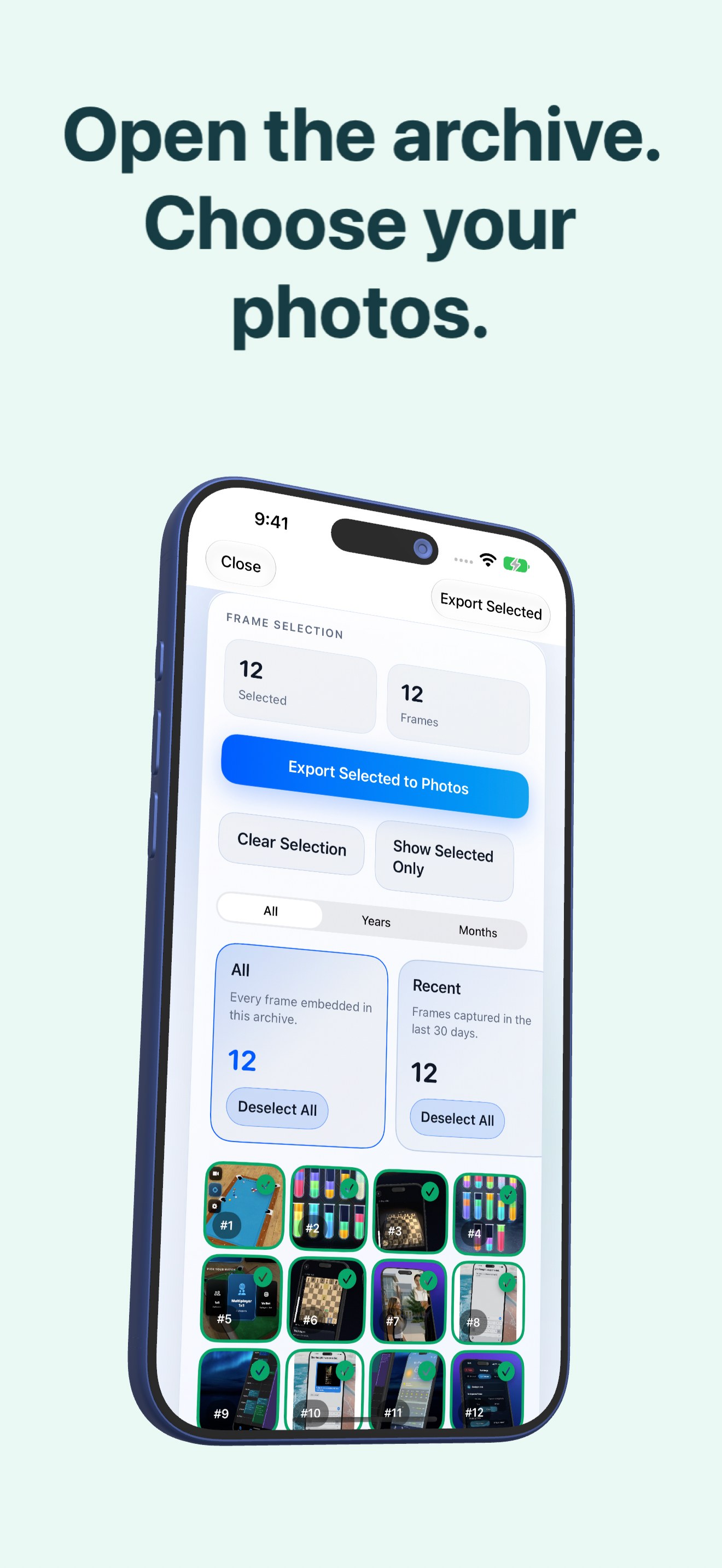
App Preview & On-Device 4K HEVC Archiving


Frequently Asked Questions
How much space does Mixed Camera Roll to 4K HEVC save on a 40,000 Photos (Multi-Year Roll) library?
Archiving 40,000 Combined HEIC, JPEG, PNG & Social Imports with Photo2Video Archive reduces total storage from approximately 144.0 GB to 14.4 GB, reclaiming 129.6 GB (90% reduction) on your iPhone, iPad, or Mac.
Can I extract individual photos back from the 4K HEVC video archive?
Yes. Every photo is stored as a discrete, indexed 4K frame. You can scrub through the archive at 60fps and export any single frame—or batch of frames—back into Apple Photos as a high-resolution still image.
Are my photos uploaded to a cloud server during compression?
Never. Photo2Video Archive performs 100% of its H.265/HEVC encoding locally on your device using Apple's hardware VideoToolbox engine. No internet connection or cloud account is ever required.